
Do Certifications Still Matter in Today’s Tech Industry?
In a world where skills can be self-taught online and portfolios often matter more than degrees, it’s fair to ask: do certifications still matter in tech?
The short answer? Yes—when used strategically.
Certifications won’t automatically land you your dream job or turn you into a senior developer overnight. But they can provide structure, credibility, and competitive advantage—especially when:
- You’re transitioning into tech from another industry.
- You want to specialize in a specific area (like cybersecurity or cloud computing).
- You’re looking to break through a promotion ceiling.
- You work in a field where compliance, standards, or vendor expertise are required.
Let’s explore how certifications can open doors in your tech career, and which ones are worth pursuing based on your goals, experience level, and area of interest.
Why Employers Still Value Certifications
Employers today understand that a certification doesn’t make someone an expert—but it does signal initiative, technical understanding, and a willingness to invest in growth.
Here’s what a relevant certification shows:
- You understand the fundamentals of the technology or process.
- You’ve met a recognized standard of knowledge.
- You can speak a shared technical language with other certified professionals.
- You’ve demonstrated commitment to learning and career development.
In fast-moving fields like DevOps, cloud infrastructure, or information security, certifications often serve as proof of capability—especially in environments where hands-on experience alone isn’t enough to meet security or compliance requirements.
Entry-Level Certifications That Open Doors
If you’re starting your tech career or switching from a non-technical role, entry-level certifications offer a fast, focused path into the industry. They help you build confidence, learn core concepts, and attract attention from recruiters scanning for signals of potential.
-
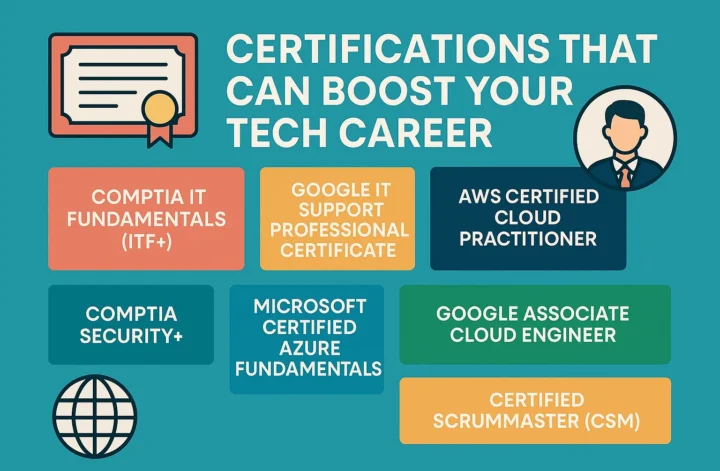
CompTIA IT Fundamentals (ITF+)
- Best for: absolute beginners with no tech background.
- Covers: basic computer hardware, networks, software, databases, and security.
- Why it’s useful: It builds foundational knowledge that helps you explore different tech domains before committing to a specialization.
-
Google IT Support Professional Certificate (Coursera)
- Best for: career switchers interested in helpdesk, support, or IT admin roles.
- Covers: troubleshooting, OS basics, networking, and customer support.
- Why it’s useful: Recognized by major employers and includes hands-on labs. Can serve as a bridge into more advanced systems roles.
-
AWS Certified Cloud Practitioner
- Best for: those entering cloud computing or SaaS industries.
- Covers: AWS basics, cloud concepts, pricing, and support models.
- Why it’s useful: Prepares you to understand cloud conversations, especially if you work in support, sales, or operations.
-
Cisco Certified Support Technician (CCST)
- Best for: aspiring network technicians or entry-level IT pros.
- Covers: networking fundamentals, IP addressing, routing, and basic troubleshooting.
- Why it’s useful: A stepping stone into the more advanced Cisco certification path.
Certifications That Help You Specialize (Early-to-Mid Career)
Once you’ve mastered the basics and want to focus on a specific area of tech, specialized certifications can help you stand out and grow into higher-responsibility roles.
-
CompTIA Security+
- Best for: IT professionals entering cybersecurity.
- Covers: risk management, encryption, threats, and incident response.
- Why it’s useful: It’s often the first certification required for security roles and a must-have in regulated industries (government, finance, healthcare).
-
Microsoft Certified: Azure Fundamentals / Azure Administrator Associate
- Best for: those working in Microsoft cloud environments.
- Covers: cloud services, Azure infrastructure, identity, and governance.
- Why it’s useful: Microsoft Azure is the second-largest cloud platform, and these certifications signal readiness for cloud-native operations.
-
Google Associate Cloud Engineer
- Best for: aspiring cloud engineers, DevOps practitioners, or infrastructure specialists.
- Covers: Google Cloud Platform (GCP) services, deployments, and monitoring.
- Why it’s useful: GCP skills are in high demand in data-driven and ML-focused companies.
-
Certified ScrumMaster (CSM)
- Best for: team leads, product owners, and developers working in Agile environments.
- Covers: Scrum methodology, roles, sprints, ceremonies, and retrospectives.
- Why it’s useful: Validates your understanding of Agile workflows and helps align cross-functional teams.
-
Linux Essentials / LPIC-1 (Linux Professional Institute)
- Best for: system administrators, DevOps engineers, or backend developers.
- Covers: Linux command line, system architecture, file permissions, and package management.
- Why it’s useful: Linux powers most of the cloud and server infrastructure—these certifications boost your operational credibility.
When Certifications May Not Be Necessary
Not every tech career path requires formal certification. If you’re working in:
- Front-end development
- UI/UX design
- Content strategy
- Marketing automation
…you may benefit more from building a strong portfolio, contributing to open-source, or gaining experience through real projects.
Certifications can still help if you want to switch domains (e.g., moving from design to cloud infrastructure), but they shouldn’t replace practical skill-building and proof of work.
How to Choose the Right Certification
Choosing a certification should never be random—it should reflect where you are and where you want to go.
Ask yourself:
- What are the skills I want to develop over the next 12 months?
- What roles or employers am I targeting?
- Do job listings for those roles mention specific certifications?
- Am I building depth in one area, or breadth across several?
If your goal is to become a cloud engineer, don’t start with a general IT support cert. Start with AWS, Azure, or GCP. If you’re aiming for a cybersecurity role, Security+ or even a Certified Ethical Hacker (CEH) path may suit you better.
Align your certification path with your desired career trajectory, not just your current job.
Advanced Certifications for Senior Tech Professionals
For those who already have several years of experience, advanced certifications can signal mastery, leadership potential, and readiness for enterprise-level roles. These credentials often require significant time, financial investment, and work experience—but they can also unlock six-figure roles, executive opportunities, and consultant-level credibility.
Here are some of the most respected high-level certifications in the tech industry:
-
Certified Information Systems Security Professional (CISSP)
- Best for: senior cybersecurity professionals and security architects.
- Covers: security architecture, risk management, cryptography, compliance, access control, disaster recovery.
- Why it’s useful: CISSP is one of the most recognized and respected security certifications globally. Many high-level security roles in enterprise or government list it as a preferred or required credential.
-
AWS Certified Solutions Architect – Professional
- Best for: cloud architects, infrastructure leads, DevOps engineers with 2+ years of AWS experience.
- Covers: complex AWS architectures, hybrid deployments, cost optimization, scalability, migration strategies.
- Why it’s useful: This cert demonstrates the ability to design and deploy enterprise-grade solutions. It’s also a strong differentiator for freelance consultants and senior engineers.
-
Google Professional Cloud Architect
- Best for: GCP-focused professionals working on infrastructure, security, and development projects.
- Covers: designing secure, scalable, and highly available GCP solutions.
- Why it’s useful: This certification is highly regarded by data-driven startups and enterprises using Google Cloud services, especially in industries focused on AI, ML, and big data.
-
Certified Kubernetes Administrator (CKA)
- Best for: DevOps engineers, SREs, and platform architects working with container orchestration.
- Covers: Kubernetes architecture, networking, storage, troubleshooting, security, and Helm.
- Why it’s useful: Kubernetes has become a de facto standard in cloud-native application deployment, and CKA demonstrates real-world expertise in managing production clusters.
-
Project Management Professional (PMP)
- Best for: tech leads, engineering managers, and program directors.
- Covers: project lifecycle, risk management, stakeholder engagement, Agile and hybrid methodologies.
- Why it’s useful: PMP is globally recognized across industries and often required for senior leadership or cross-functional project roles. Tech professionals with PMP can bridge the gap between technical execution and business strategy.
Preparing for Certification: Study Smarter, Not Just Harder
Passing a certification exam requires more than memorization. The most successful candidates treat it like a structured project with a clear goal, timeline, and accountability.
Here’s how to prepare effectively:
-
Understand the Exam Format and Objectives
Before you begin studying, get familiar with the structure of the exam:
- Number of questions
- Types of questions (multiple choice, hands-on labs, case studies)
- Time limit
- Passing score
Then download the official exam blueprint or objectives guide. These outlines show you exactly what topics you’ll be tested on—use them to guide your study plan.
-
Use Multiple Study Sources
Relying on a single YouTube tutorial or course isn’t enough. Combine several learning methods:
- Online video courses (e.g. Udemy, Coursera, A Cloud Guru)
- Official documentation (for platforms like AWS, Google Cloud, Cisco)
- Practice exams to simulate test conditions
- Flashcards for terms and acronyms
- Reddit, Discord, or study forums to clarify confusing topics
For hands-on certifications (like CKA or AWS Architect), lab practice is essential. Set up your own sandbox environments or use platforms like Qwiklabs or Katacoda.
-
Set a Realistic Study Schedule
Break your preparation into weekly goals:
- Week 1–2: Watch intro courses and skim all topics.
- Week 3–5: Deep dive into each section with notes and exercises.
- Week 6: Take practice tests, review weak areas, refine your knowledge.
- Week 7: Final review and test scheduling.
Consistency matters more than cramming. Even 60–90 minutes a day is enough if you stay focused.
-
Don’t Study Alone
Join study groups or online communities. They’ll help you stay accountable, share resources, and offer moral support when the material gets tough. Some communities even run mock test sessions or group discussions that mirror real exam scenarios.
How to Showcase Certifications to Employers
Once you’ve earned a certification, it’s time to put it to work. Here’s how to make sure recruiters and hiring managers actually see your achievement.
-
Update Your LinkedIn Profile
Add the certification under “Licenses & Certifications.” Use the official certification name and issuer. If applicable, include:
- A short summary of what the certification covers.
- A link to your digital badge or credential verification page.
For example:
AWS Certified Solutions Architect – Associate
Amazon Web Services (Issued April 2025)
“Demonstrates ability to design secure, scalable AWS architectures. Focused on compute, networking, storage, and monitoring services.”
-
Feature It in Your Resume Summary or Skills Section
If the certification is relevant to the role you’re applying for, mention it in your:
- Resume summary: “Certified Cloud Practitioner with hands-on experience in GCP and Kubernetes.”
- Skills/Tools section: Group certifications with relevant tools or platforms.
- Project descriptions: Highlight how you applied your certification knowledge in real-world work.
-
Mention It in Interviews
Certifications make great talking points in interviews. Use them to:
- Explain your learning mindset (“I took initiative to build cloud skills via AWS certification.”)
- Demonstrate applied knowledge (“During my CKA prep, I built a Kubernetes cluster from scratch—something I now use daily.”)
- Show goal-setting ability (“I set a 2-month goal to pass PMP and planned my study in sprints.”)
Certs alone won’t get you hired—but they add depth and proof to your story.
Are Certifications Worth the Cost?
Certification programs can range from $100 to over $1,000—not including prep materials. So are they worth it?
Here’s how to decide:
Worth it when:
- You’re switching industries or roles and need to build credibility fast.
- You’re seeking a promotion or raise in a highly structured environment.
- The certification is widely recognized and included in job listings.
- You’re motivated by structured learning with a clear goal.
- Your employer offers reimbursement or funding.
Less valuable when:
- You already have years of deep experience and strong references.
- You’re in a creative or product-focused role where portfolios matter more.
- You’re pursuing certifications with low industry recognition.
Think of certifications as accelerators—not replacements for real-world skills, but valuable companions.
Final Thoughts: Make Certifications Part of a Bigger Plan
Certifications are most powerful when integrated into your overall career strategy. They’re not just items to collect, but tools to:
- Pivot into a new field.
- Signal readiness for more responsibility.
- Build confidence and technical fluency.
Approach them with purpose. Choose ones aligned with your aspirations. Study with discipline. Apply what you learn immediately. And use your new knowledge to elevate your work and your visibility.
In a world where learning never stops, certifications are one more way to keep growing—and show the world you’re ready for more.